
The fix was simple – almost too simple. While it was true that there was a lot of background noise from the microphone, it was not unsolvable. My first thought was to return the mike to Target where I found it. But then, there was the fact that I was using some pretty high-class software to record and edit with. Namely, Sony Sound Forge. Recorded a little test track, and listened again, even after adjusting the record level a little lower in Windows 7. Time for some serious action.
Highlighted the test sec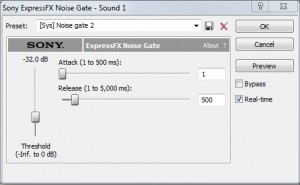 tion, and applied the default “Noise Gate” to that section, and wonder of wonders. The noise was gone, and there was no perceptible clipping (for non-audio professionals, that is cutting off of the head end of words after silence). BTW, clipping is a bad thing. When carried to extreme, it makes the recording very choppy. What you want is an “easy over” sound that sounds prefectly natural.
I went back and reviewed all the possibilities (pre-built), and discovered that “Noise gate 2” actually did the job. That makes using this real easy. Record, edit, noise gate, and if necessary Dynamics (2:1 or 3:1) for an outstanding finished product.
This sure beats the other way to get rid of the noise – putting a bed of music (louder than the noise) under the voice, so that it becomes a “voice over”. The problem with this approach is that depending on the level of the noise, the music becomes an annoyance to the listener who is trying to hear the voice.
You can check out the products mentioned at these links: Sony Sound Forge or Logitech